Need Help?
Please leave your contact information to get our latest catalog
Get In Touch Now >


Author:SOP Work Pods Manufacturer TIME:2026-07-30
Table of Contents
1. Translate the owner's workday into requirements
2. Test the booth against the home, not a showroom
3. Protect client trust and business records
4. Design for reliable calls and connected work
5. Assess comfort over a real working block
6. Compare cash flow instead of sticker price
7. Account for service and ownership burden
8. Plan for growth, relocation, and resale
9. Build an owner decision table
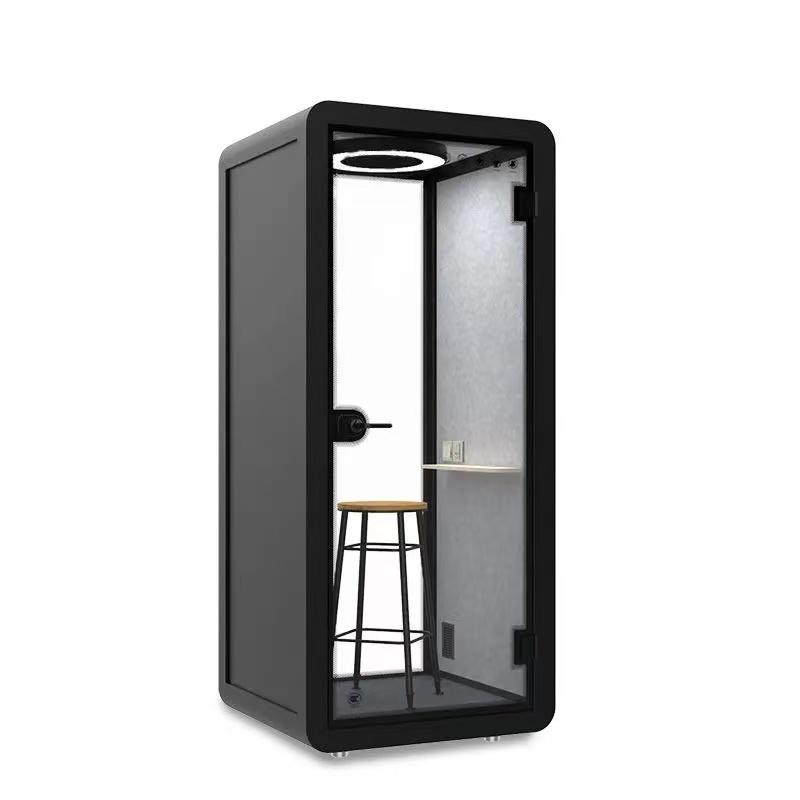
A home office booth can give a small business owner a stable place for focused work, customer calls, online consulting, interviews, or content production. It can also become an expensive enclosure that is too warm, difficult to move, poorly connected, or rarely used. The difference comes from comparing the booth against the business's real work and financial constraints rather than treating it as an office decoration.
Small businesses usually have little tolerance for avoidable downtime. The owner may be the salesperson, operator, bookkeeper, and support desk at once. A sensible comparison therefore covers task fit, room fit, client privacy, digital reliability, long-session comfort, total cost, maintenance, and an exit path if the company or household changes.
Keep a five-day activity log before choosing a configuration. Record calls, concentration periods, document handling, camera use, product samples, equipment, and the number of times another person needs access. Note the longest uninterrupted session and the busiest overlap with household activity. The goal is to learn what the booth must support, not what an idealized workday looks like.
Classify tasks by environment. Confidential client calls may need controlled speech audibility and a clean video background. Bookkeeping may need two screens and secure document placement. Creative work may benefit from quiet but require a drawing tablet, microphone, or reference materials. Packing orders probably belongs elsewhere. A booth should concentrate the tasks that benefit from enclosure without forcing unsuitable activities into a small space.
Turn observations into measurable requirements: usable work-surface dimensions, device count, power outlets, seated clearance, session duration, background-noise target, camera distance, storage need, and expected hours per week. Distinguish non-negotiable requirements from conveniences. This prevents a low-priority finish choice from outweighing air comfort or network reliability.

Measure the proposed room at floor, desk, and ceiling levels. Include skirting boards, sloped ceilings, doors, windows, radiators, vents, sockets, curtains, and furniture that must remain. Mark the booth footprint and required service clearance with removable tape, then walk normal household routes around it. Open every nearby door and drawer.
Review delivery as a separate exercise. Record the narrowest doorway, corridor turn, staircase, landing, lift, and exterior access point. Ask for the largest packaged component and installation working area. An assembled footprint can fit the room while individual panels fail to pass a stair turn. Confirm who protects floors and walls and who is responsible for damage.
Location affects acoustic value. A booth beside a washing machine, street-facing window, or family television faces a different noise profile from one in an interior room. Listen at expected working hours and note impact, plumbing, voices, traffic, and mechanical sound. The best location often reduces the burden on the booth before any product feature is considered.
For consultants, recruiters, therapists operating within appropriate professional rules, accountants, designers, and service providers, privacy is a workflow. A booth may reduce the chance that household members hear a call, but it does not protect an unlocked screen, visible paper, cloud account, smart speaker, or recording left on a shared computer.
Map information from arrival to disposal. Decide where paper is stored before a call, whether a screen can be viewed through glazing, how notes are filed, where recordings are saved, and how waste is destroyed. Use a headset when it improves control, lock devices when leaving, and remove unrelated voice assistants from the space. The business should follow its applicable contractual, professional, and data-handling obligations.
Test speech behavior from realistic listening positions around the home. Use normal and animated call voices, with doors in their usual state. Avoid claiming absolute confidentiality from a product name. If sensitive work exceeds the demonstrated privacy level, use a more suitable location or additional administrative controls.
A home office booth can weaken wireless signals depending on construction and router position. Run repeated speed, latency, and call tests from the marked location during busy household periods. One strong speed-test result does not represent a full video meeting. Check voice stability, screen sharing, file access, camera quality, and reconnection after a brief interruption.
Where reliable work is essential, plan a wired network route or a professionally configured wireless solution before installation. Do not trail permanent cables across the floor or pinch them through a door seal. Keep the router, modem, and any network hardware ventilated and accessible. Define a backup method such as a tested mobile connection, while considering coverage and business security.
List power demand for laptop, displays, light, charger, camera, microphone, and any heating or cooling equipment outside the booth. Confirm circuit suitability and outlet placement. A buyer can compare a suitable home office booth configuration, then require a clear cable-entry plan that preserves safe access and the enclosure's intended acoustic behavior.

Comfort should be tested for the longest normal work block, not a brief visit. Sit with all devices running and the door closed. Observe temperature, air movement, fan sound, glare, screen reflection, seat pressure, elbow room, reach, and ease of standing. Repeat at a warmer time of day if sunlight or seasonal heat affects the room.
Check whether the work surface supports neutral posture. A shelf can look generous in a photograph but become shallow after a monitor stand and keyboard are installed. Measure screen distance, eye height, knee space, and mouse movement. If the supplied seat is fixed, confirm that it suits the primary user; if seating is movable, verify that the door and circulation remain usable.
Plan breaks outside the enclosure. A booth is a focused workspace, not a reason to remain seated all day. Decide how long concentrated blocks should last and where calls, files, drinks, and personal items go. Keep ventilation openings clear and avoid adding unapproved soft furnishings that restrict airflow or increase fire risk.
Create a total-cost schedule covering purchase, shipping, taxes, installation, floor protection, electrical or network work, accessories, insurance implications, routine service, replacement filters, repairs, disassembly, storage, and eventual removal. Ask which costs are fixed and which remain estimates. A lower purchase price can become more expensive if specialist labor or repeated service is required.
Compare purchase with realistic alternatives: improving an existing room, renting local workspace for selected days, using a coworking call room, or combining a smaller booth with off-site client meetings. Calculate the cost per useful hour based on expected use, not maximum theoretical availability. Include travel time, missed calls, and household disruption where they materially affect the business.
Use conservative benefits. Potential value may include fewer interrupted calls, better concentration, higher appointment capacity, or avoiding external rent. Do not treat every saved minute as revenue. Run a base case, a low-use case, and a growth case. The investment should remain manageable if sales fluctuate.
Ask who provides installation, warranty support, spare parts, remote troubleshooting, and on-site service in the buyer's area. Record response expectations and exclusions. A warranty has limited operational value if a critical fan or door component takes months to replace. Obtain model-specific parts information where possible.
Daily ownership includes cleaning, checking seals, managing cables, clearing vents, and reporting unusual noise. Identify approved cleaning products for glazing, work surfaces, upholstery, and acoustic materials. Strongly scented products can make a small enclosure unpleasant, while excessive moisture may damage finishes.
Keep a simple maintenance log with dates, symptoms, actions, and parts. It helps distinguish a recurring design or installation fault from isolated wear. The business should know how to work during downtime; a fallback call location and portable equipment kit can prevent one failed component from stopping customer service.
Small businesses change quickly. The owner may hire staff, move home, lease an office, or change service model. Ask whether the booth can be dismantled and rebuilt, how many moves are supported, which components are likely to need replacement, and whether authorized installation is required to preserve coverage.
Verify the exit route as carefully as the delivery route. Keep assembly drawings, fastener maps, packaging recommendations, serial numbers, finish codes, and photographs. Avoid permanent modifications unless they are approved and the restoration cost is understood. If resale matters, neutral finishes and complete documentation may be more valuable than highly personalized branding.
Consider the next capacity step. A one-person booth may remain useful for calls after the company hires a team, but it cannot become a meeting room. The buyer should know whether future expansion means adding another booth, selecting a larger model now, or changing premises. Paying for unused capacity today is not automatically the prudent choice.

A comparison table should use the owner's evidence and a pass condition. Weighted scores are useful only after essential room, access, electrical, and business requirements are satisfied.
| Decision area | Owner's evidence | Pass question | Common hidden cost |
|---|---|---|---|
| Task fit | Five-day activity log and equipment layout | Does it support the highest-value recurring tasks? | Buying space for unsuitable activities |
| Home fit | Measured room, delivery route, noise notes | Can it arrive, operate, and be serviced safely? | Special handling or room alterations |
| Client trust | Speech test and information-flow review | Are privacy claims matched by working controls? | Additional secure storage or alternate room |
| Digital continuity | Busy-period calls and backup connection test | Can customer work continue through a failure? | Network installation and backup service |
| Human comfort | Longest-block occupied trial | Can the owner work without heat or posture strain? | Seat, monitor arm, or environmental changes |
| Financial resilience | Low, base, and growth cash-flow cases | Is the cost manageable in a weak sales month? | Installation, servicing, removal, financing |
| Exit flexibility | Move and resale documentation | Can the business recover value when circumstances change? | Disassembly, storage, restoration, replacement parts |
Is a home office booth tax deductible?
Tax treatment depends on jurisdiction, business structure, use, and current rules. Keep invoices and use records, and obtain advice from a qualified local tax professional rather than relying on a product category.
Will a booth improve video-call quality?
It may reduce distractions and create a consistent setting, but lighting, camera position, microphone, network, ventilation noise, and background still need to be tested together.
Should an owner buy a larger booth for future staff?
Only when the growth case is credible and the room supports it. A larger enclosure costs more and uses more home space. Current task fit and a clear expansion plan are stronger guides.
Can a renter install one?
A renter should review lease and building rules, obtain written permission where needed, verify loads and delivery, and plan restoration. Freestanding does not always mean approval-free.
How can competing quotes be compared fairly?
Give every supplier the same measured brief and request the same scope: product, delivery, installation, service, evidence, exclusions, lead time, and removal assumptions.
A home office booth is a good small-business choice when it supports the owner's real tasks, fits the home and delivery route, protects client work through several controls, maintains reliable connectivity, and remains comfortable for normal sessions. Those benefits should be compared with total ownership cost and practical alternatives, not purchase price alone.
The most useful decision record is a short workbook built from observed work, measured space, live call tests, an occupied comfort trial, conservative cash-flow scenarios, and an exit plan. That evidence helps the owner buy for the business that actually exists while preserving flexibility for the business that may come next.

 Tel: +8613538031763
 Email: info@sopworkpod.com
 MP/WhatsApp: +8613538031763
 Manufacturer Address:Liucheng Lujiang District,Meixi Road,Nanan City,Fujian,China


