Need Help?
Please leave your contact information to get our latest catalog
Get In Touch Now >


Author:SOP Work Pods Manufacturer TIME:2026-08-28
An employee ends a video call early and says the booth felt noisy. That statement is useful, but it does not identify the cause. The discomfort could involve the sound of the user's own voice, hard internal reflections, a fan setting, device playback, office speech leaking into attention, sudden impacts outside, or the effort of speaking and listening for a long session. Acoustic comfort is an occupied experience, not a synonym for isolation.
Diagnose the complaint before changing several things at once. Capture the task, symptom, time, booth state, device, door position, fan control, surrounding activity, user response, and any coping behavior. Then alter one credible variable and repeat a comparable part of the task. This makes improvement or deterioration visible without pretending that a personal observation is a laboratory measurement.
A Booth Office may feel comfortable for a short voice call and tiring during a longer video meeting. Another user may react differently to the same fan or reflection. The release decision should therefore describe accepted conditions and user variation. The practical output is a symptom-change-retest log, with unresolved complaints routed to a named owner rather than buried under a general acoustic claim.
Ask the employee to describe what happened in ordinary language. Useful phrases include echo around speech, a constant mechanical sound, difficulty hearing the remote participant, outside voices pulling attention, pressure to speak louder, a sudden disturbance, or fatigue that appeared later. Avoid translating every report into poor soundproofing. Different symptoms point to different paths and controls.
Record when the issue began and what changed immediately before it. Note the task, call platform, headset or speaker use, microphone position, booth occupancy, door state, fan and lighting settings, session stage, nearby office event, and whether leaving the booth relieved the problem. Include what did not feel wrong; absence narrows the investigation.
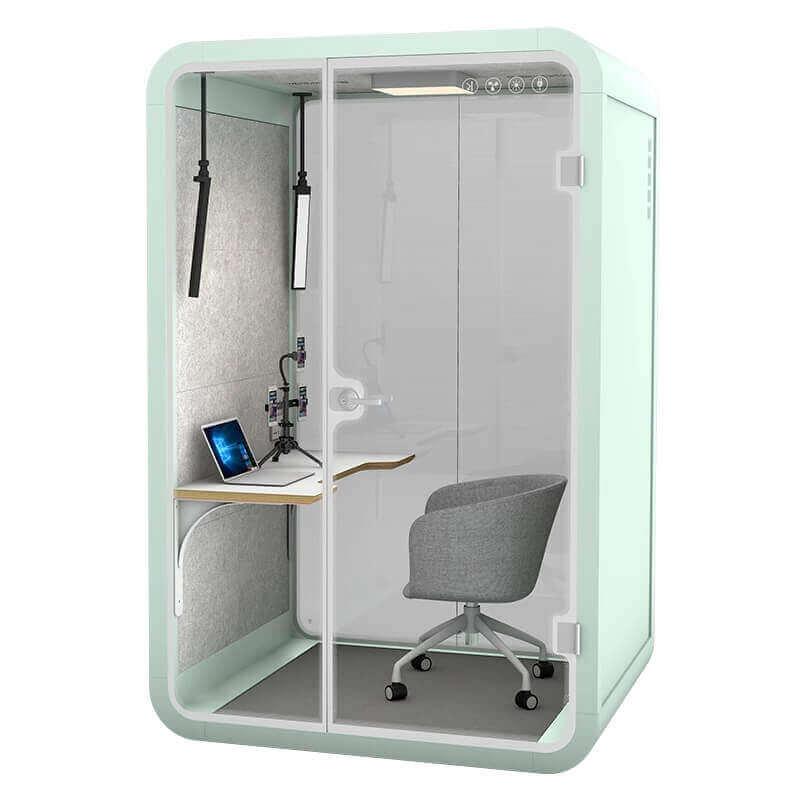
A user's own voice reaches the ears directly, through the body, and after reflecting from nearby surfaces. Device monitoring or loudspeaker output can add another path. Review seating or standing position, distance to glazing and panels, microphone monitoring, speaker volume, interior finish, furniture, and any hard object placed close to the user. The aim is to identify a condition, not to declare one material good or bad.
Repeat a short representative speaking task with one controlled change, such as device mode, user position, or an approved product control. Keep door, fan, surrounding activity, and content comparable. Ask the user what changed and observe whether speech becomes easier or a new problem appears. Do not combine several adjustments, because the record would no longer show which one mattered.
Internal acoustic comfort and external privacy are related but separate decisions. A change that feels better to the speaker may affect what nearby listeners hear, while stronger masking outside may not improve reflections inside. Preserve both observations when releasing a configuration. If the proposed correction lies outside approved product use, hold it for supplier or site review.
Fan sound cannot be judged in isolation from occupied air movement. Record the available control state, perceived airflow, door condition, session duration, heat from people and devices, and the task being performed. A user who lowers the fan to avoid sound may later open the door or leave early. That coping behavior is evidence that the combined condition has not been resolved.
Document the accepted control state and its limit. The result may apply to one occupancy and duration, not every session. If several users need materially different settings, the operating guidance should allow that variation or the product and location should be reviewed. Acoustic comfort is not improved when users must choose between an objectionable sound and an unsuitable occupied condition.

Residual office sound may be tolerable until a specific event occurs. Door closures, nearby conversations, passing groups, equipment, alarms, cleaning activity, or calls at adjacent desks can differ in character and predictability. Record the event, source location, booth and listener position, time, door state, background activity, and effect on the employee's task. A general noise label loses that actionable detail.
Observe likely paths around the complete installed booth: door perimeter, joints, glazing, floor and ceiling interfaces, ventilation or service openings, and the receiving room. This is a field trace, not a substitute for model-specific documents or formal testing where those are required. It helps distinguish a location conflict from an enclosure fault or an unrealistic expectation about audibility.
Test a location or operating correction with the original event where practical. Moving a high-interruption activity, changing orientation, correcting a door issue, or adjusting nearby behavior may change the result without altering the booth. Keep unsuccessful changes in the log. They prevent the same idea from returning later as an unverified fix.
| Reported symptom | Single variable changed | Observation to retain | Next route |
|---|---|---|---|
| Voice sounds harsh or tiring | User position, approved interior condition, or device monitoring | Own-voice response plus external privacy observation | Keep, refine, or inspect the internal path |
| Fan is distracting | Permitted control state with comparable occupancy and task | Sound character, airflow response, coping behavior, and duration | Accept setting or route suspected fault to service |
| Outside event breaks concentration | Source activity, orientation, location, or corrected interface | Event, path, listener position, booth state, and task effect | Change site condition or investigate enclosure interface |
| Calls require extra effort | Device, microphone, loudspeaker, level, or approved application setting | Behavior of user and remote participant across the call chain | Assign to IT, workplace, supplier, or guidance |
| Discomfort grows over time | Comparable session after the selected correction | Time reached, symptom progression, workaround, and stop point | Limit use, retest, or provide another setting |
Employees may describe acoustic discomfort when the underlying problem is communication effort. Review microphone selection, loudspeaker or headset, volume, echo behavior, network condition, remote participant environment, application settings controlled by the organization, and the user's speaking level. The booth is one part of that chain. A poor remote signal should not be misdiagnosed as an enclosure failure.
Run a normal call with an informed remote participant and note both sides. Does the user speak louder, repeat phrases, lean toward the device, remove a headset, change volume often, or pause the fan? Does the remote side report level changes or distracting background? These observations reveal workarounds that a simple sound check misses.
Assign each finding to the correct owner: workplace, IT, supplier, facilities, or user guidance. After the physical and device conditions are understood, the office pod configuration range may help compare relevant options. It cannot replace the end-to-end call trial, because comfort depends on how the installed space and communication chain operate together.
Keep duration attached to the observation. Comfort during a quick call does not release the same setup for an extended meeting. Conversely, one difficult long session should not automatically reject every shorter use. Segment the booth assignment by task and duration until evidence supports a broader role.
Recheck after correction under comparable conditions. If the user no longer adopts the earlier workaround and can complete the task, record the improvement with its limits. If another symptom replaces the first, continue the diagnostic route instead of closing the ticket because one variable moved in the preferred direction.

Acoustic comfort varies with hearing, voice, device preference, task, concentration demands, and sensitivity to particular sounds. Include a reasonable range of intended users without turning a small review into a universal survey claim. Preserve disagreement. Two users can report different responses and both observations can be valid for the assignment decision.
Group findings by condition rather than averaging them into a vague approval. One configuration may work for headset calls, another for device speakers, and a third may remain unsuitable near a recurring office event. Define which condition is accepted, which requires adjustment, and which needs an alternative setting. Provide a clear route for an employee who cannot use the accepted setup comfortably.
Finish with ownership and recurrence signals. Repeated fan noise, changing door fit, a new neighboring activity, device replacement, relocation, altered furniture, or a cluster of similar complaints should reopen the diagnostic log. Maintenance and workplace teams need the original baseline so they can tell whether the booth, room, technology, or assignment has changed.
No. Sound isolation concerns transmission between a source and receiver through the complete construction and its interfaces. Acoustic comfort also includes reflections, own-voice response, fan and device sound, airflow, control, duration, predictability, and the effort required to complete the task. An enclosure may reduce one sound path while a user still finds another condition tiring.
Keep the two decisions connected but separate. Record external listener observations beside the employee's occupied response, then avoid extending either result beyond the tested configuration and task.
Attention, call content, device use, a quieter surrounding moment, control setting, vibration, or an actual service issue can change how the fan is perceived. The cause cannot be identified from the complaint alone. Compare permitted states while keeping occupancy, device, and task as stable as practical.
If the sound has changed character, varies unexpectedly, or is accompanied by another fault sign, route it to maintenance. Do not ask users to solve a suspected equipment problem by accepting poor airflow or opening the door.
It may improve a location-specific problem, such as exposure to a recurring nearby event, but movement also changes room reflections, background sound, routes, services, and the source-listener relationship. Relocation should follow model-specific handling and recommissioning requirements rather than being treated as a simple acoustic adjustment.
First show that the complaint is connected to the current location. Then qualify the destination and repeat the accepted occupied checks after the move.
There is no universal number in this article. Include the people and task variations needed to challenge the intended assignment, especially where device choice, duration, voice use, or sensitivity differs. A small local review should be described as local evidence, not a survey of all employees.
Preserve outlying or adverse responses. The practical goal is to define accepted conditions and an alternative route, not to average away a user who cannot work comfortably in the setup.

A Booth Office enhances acoustic comfort when its installed sound paths, fan and airflow state, device chain, controls, location, and assigned session work together for the employee. Comfort cannot be released from an isolation label or a brief demonstration, and it should not be reduced to one subjective score.
Close one controlled symptom correction. Write the original complaint, task, booth state, variable changed, user response, external observation where relevant, accepted limit, fallback, and trigger for another review. That diagnostic record lets the team correct the right cause and recognize later drift instead of repeating a general comfort debate.

 Tel: +8613538031763
 Email: info@sopworkpod.com
 MP/WhatsApp: +8613538031763
 Manufacturer Address:Liucheng Lujiang District,Meixi Road,Nanan City,Fujian,China


