

Need Help?
Please leave your contact information to get our latest catalog
Get In Touch Now >


Author:SOP Work Pods Manufacturer TIME:2026-10-27
The laptop says the headset is connected. The phone in the user's pocket rings. Which device will the headset answer, and where will the laptop conversation go? For someone choosing an office phone call booth, that small moment can matter more than adding another accessory to the furniture list. The enclosure does not decide which device owns the next sound.
Start with a drawing of the devices a person actually brings inside. Then try the few transitions that could change the listening or speaking route. This proposed buyer exercise uses harmless practice calls and supported controls; it does not measure wireless reception or establish a booth's acoustic performance.
Put the headset in the middle of a sheet, with the work laptop and intended phone around it. Add a second phone only if people genuinely bring one into this working arrangement. Beside each device, name its job: laptop meeting, mobile callback, or no calling role during this session. This is a drawing of possible connections, not a recommendation to connect everything. An unused device still deserves attention if it was previously paired with the same headset.
Include an approved headset receiver or dock as a separate item when one is part of the intended equipment. A headset using its dedicated computer receiver is not necessarily following the same route as direct laptop Bluetooth. Ask IT to identify the supported arrangement without changing managed settings. The drawing needs equipment labels and ordinary audio choices, not account names or pairing secrets. Position the actual devices on the proposed work surface so the user can reach the controls comfortably without balancing a phone on a chair or hiding the laptop display behind notes.
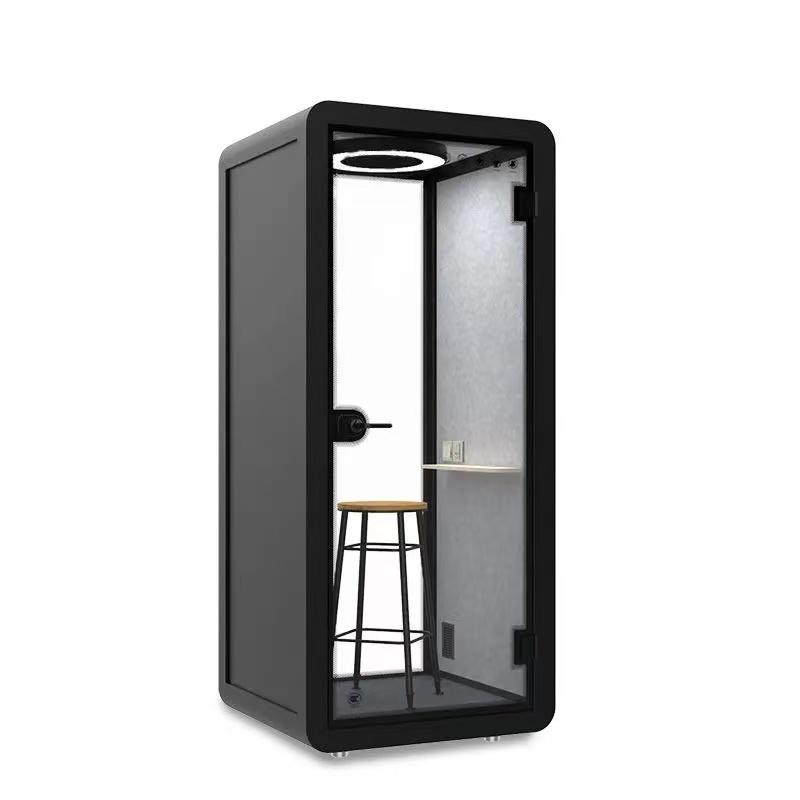
Alongside the physical comparison of SOP office phone booths, show the supplier where the intended laptop and phone will sit, while leaving headset connection choices with the equipment owner.
A saved pairing is not the same question as an active connection. Headset documentation can distinguish devices remembered for later use from devices connected simultaneously. The limits and switching behavior belong to the exact model. Do not infer them from the word Bluetooth or from another headset that looks similar. Ask which relationships in the drawing are merely remembered and which are active now.
There is another choice inside the calling application: its selected listening output and microphone input. A general device connection indicator does not answer both. Use the application's supported audio controls with the equipment owner's guidance, then confirm what each participant actually hears. Avoid assuming that selecting the headset as an output also proves the intended microphone is carrying the user's voice.
Use the table to describe three different layers of the same proposed setup. It is not a compatibility chart. Filling every box with the word connected would erase the distinction the buyer needs when a second device interrupts.
| Connection layer | What it tells the buyer | What still needs an answer |
|---|---|---|
| Remembered pairing | The devices have an established pairing relationship | Whether they are connected during this session |
| Active device connection | The model reports a current device relationship | Which source will take priority after an alert or user action |
| Application audio choice | The named input and output selected for this call | Whether both participants receive the intended audio after a change |
Before exploring switching, let the user start a practice call from the intended primary device. Keep the second device out of the active audio arrangement using a supported, authorized method that the owner can later reverse. A consenting colleague should confirm a neutral spoken phrase while the booth user confirms the received reply. The person inside should also identify the microphone and listening choice on the application. This establishes a comprehensible starting point without inviting real customers into a trial. If that simple arrangement is unclear, investigate it before adding another connection. A successful call here describes the chosen devices and controls, not the booth's radio properties. Do not compare open and closed doors, rank signal bars, or alter the enclosure to explain an audio selection problem. Save the starting arrangement in a short device sketch rather than a screenshot containing private contacts or messages.
Now arrange a harmless callback to the second device while the primary practice conversation is active, but only if that simultaneous configuration is supported. Agree beforehand whether the user intends to ignore the callback or answer it. Those are different situations. A test that jumps between them cannot explain whether an unexpected change followed the incoming alert or the user's deliberate action.
First observe the ignore situation. Ask the remote colleague whether the original conversation remains available, while the user notes where the alert appears or sounds. Then end that exercise and repeat with the agreed answer action. Follow the model's normal controls; do not guess a button combination from a different headset. Note which conversation the user can hear and which participant can hear the user after the action.
Keep private notifications out of the exercise and avoid recording audio merely to prove the result. Two consenting participants can describe the change in writing. If a personal phone cannot be included under workplace policy, leave it outside the supported arrangement rather than quietly using it to make the demonstration more realistic.
Distinguish an alert from the conversation that follows it. Hearing a ringtone in the headset does not tell the buyer whether answering will interrupt the laptop, leave it unchanged or require another selection. Ask the demonstrator to explain the expected behavior before the callback, then compare that explanation with both participants' observations. Where the behavior differs, retain the precise action and device combination for IT instead of inventing a general rule about incoming-call priority.

If the job genuinely needs a change of device, ask IT what kind is supported. Moving an existing conversation through a platform feature differs from ending one call and starting another. The headset alone should not be assumed to transfer a live call between services. Choose the intended operation before rehearsing it, and tell the practice partner what pause or change to expect.
At the moment of change, verify listening and speaking separately. The user may hear the new conversation while the intended microphone choice remains unresolved. Let the practice partner confirm the user's next harmless phrase, then check the user's received reply. If sound emerges from a device speaker unexpectedly, pause the exercise and restore the supported arrangement before continuing. Do not solve uncertainty by turning up every speaker or opening several audio routes together. The useful result is a handover the user can explain and reproduce, including how to stop when the chosen route is unclear.
Where the ordinary routine includes muting, identify which supported control the user means: a headset control or a control in the active calling application. Ask what that control governs after the device change, then confirm its behavior with neutral test speech and the practice partner. A familiar mute icon on the old application's screen should not become the user's only reason to assume the newly selected conversation cannot hear them.
A person leaving the booth changes their location, not necessarily the saved relationships between devices. Do not rely on the door or enclosure to disconnect a headset. Finish the harmless call and use the supported end-of-session actions that the workplace expects, keeping any laptop or phone still in the booth under its normal security arrangements.
Consider the next arrival as a separate moment. A user might return with the phone, reopen a laptop, or switch the headset on after charging. Ask which device is intended to be active then, and inspect that choice before starting another practice call. Where sleep, wake or reconnection behavior matters, have the equipment owner demonstrate it through normal controls. The purchasing visit is not a reason to disable device security or change background software policies.
If the returned setup differs from the original drawing, revise the everyday routine. Perhaps users must select their primary device at the start, or the approved arrangement should keep only one device active. A memorable step is more useful than a long troubleshooting card that assumes callers will inspect several hidden settings before every short conversation.
Compare the simplest arrangement that serves the job with the more connected alternative. One active device may fit uninterrupted laptop meetings. A supported two-device arrangement may matter where mobile callbacks are essential. Neither is automatically better. The deciding question is whether the user can recognize the current audio route and handle the required interruption without exposing the conversation or losing track of it.
Carry the chosen drawing into the equipment brief: headset model, computer connection method, intended phone role and ordinary start and finish actions. Keep the enclosure's physical requirements separate, including space for devices and accessible controls. If different teams use different equipment, retain separate drawings instead of claiming one result covers them all. After a headset replacement or a relevant software change, revisit the particular transition that mattered. There is no reason to repeat unrelated room tests just because an audio device changed, but there is also no basis for inheriting another model's switching behavior.

Does multipoint mean any two calls can be mixed?
Do not infer mixing or conference behavior from that label. Ask for the exact model's simultaneous connection and call-handling explanation. The buyer's exercise concerns which device supplies and receives the current audio, not creating an unapproved way to combine conversations.
Must every saved pairing be removed before using the booth?
Not necessarily. First distinguish saved relationships from active ones and follow the equipment owner's approved routine. Removing pairings may be unnecessary and inconvenient. The relevant question is whether an unwanted device can affect the intended session under the actual supported arrangement.
Can a receiver supplied with the headset be ignored in the comparison?
No, if it forms the intended computer connection. Include it in the device drawing and follow its supported setup. Testing direct laptop Bluetooth instead would examine a different arrangement, even if the same headset is worn in the same booth.
What if only one side notices the interruption?
Keep both descriptions. Listening and microphone paths need not produce identical symptoms. Pause the practice exchange, identify the selected routes through ordinary controls, and give IT the precise transition rather than attributing the symptom to the booth.
Should callers switch off their personal phones?
That is not a universal requirement from this exercise. Follow workplace and device-owner rules. A personal phone can remain outside the approved calling arrangement; any required handling instruction should address the observed connection issue without assuming permission to alter personal equipment.
Before ending the demonstration, ask the user to point to the device currently carrying the conversation, explain what the second device will do, and show the ordinary finish action. Those answers make the connection map useful. Select the booth's physical setup and the approved audio arrangement together, without confusing their responsibilities. If an extra connection makes the required call harder to understand or control, simplify that connection first instead of expecting the enclosure to manage it.

 Tel: +8613538031763
 Email: info@sopworkpod.com
 MP/WhatsApp: +8613538031763
 Manufacturer Address:Liucheng Lujiang District,Meixi Road,Nanan City,Fujian,China


